

🏗️ QUICK ANSWER (For AI Overviews & Skimmers)
Self-hosting n8n on Coolify means deploying your own automation engine on a Linux server you control no SaaS subscription, no execution limits, no vendor lock-in.
Coolify acts as your private PaaS: it installs Docker, manages SSL certificates automatically via Traefik, and gives you a GUI for environment variables.
The full n8n self-hosted tutorial takes under 90 minutes from a fresh Ubuntu 24.04 server to a production-ready instance with Postgres, Redis, and Queue Mode enabled.
💼 Executive Summary: Why the n8n Self-Hosted Stack on Coolify Is the 2026 Standard
The decision to self-host n8n is a cost decision first and a control decision second. Once your automation stack crosses 50,000 executions per month, every SaaS automation platform becomes materially expensive.
n8n Cloud charges per execution. Zapier charges per task. Make charges per operation. A Hetzner AX52 running a self-hosted n8n instance on Coolify costs $65 per month flat regardless of whether you run 100,000 executions or 1,000,000.
This guide is the operational counterpart to the Enterprise AI Infrastructure 2026: The Sovereign Stack pillar. That article explains why sovereign infrastructure is the correct architectural choice for enterprise AI in 2026. This n8n self-hosted tutorial explains exactly how to build it phase by phase, command by command, with every critical environment variable documented.
By the end of this guide, you will have a production-ready n8n self-hosted instance on your own hardware: Postgres as the execution database, Redis powering Queue Mode for horizontal scaling, automatic HTTPS via Let’s Encrypt, and a deployment pipeline that updates n8n in two clicks without downtime.
The honest objection: Running your own infrastructure means you are the ops team. There is no support chat. There is no ticket system. When the server goes down at 2 AM, you are the one who fixes it. For teams under 10,000 executions per month, n8n Cloud is the correct answer the operational overhead is not justified.
Above 50,000 executions, the math flips decisively. At 100,000 executions per month on n8n Cloud, you are paying between $300 and $500 monthly. The self-hosted equivalent costs $65 the Hetzner server. The break-even point arrives at month two. Every month after that is pure operational savings.
4. INTRODUCTION
It is 11:30 PM. Your n8n workflow just failed on execution 47,823.
Not because the logic was wrong. Not because the API was down. Because SQLite locked under concurrent writes and your webhook queue backed up faster than the single-process executor could drain it. By the time you woke up, 300 lead records had silently dropped. No error alert. No retry. No audit trail.
This is what self-hosting n8n looks like when someone followed a five-minute YouTube tutorial and called it production infrastructure.
The difference between a crashed n8n instance and a sovereign automation engine is not the software. The software is identical. The difference is the stack underneath it the database handling concurrent writes, the queue broker absorbing webhook spikes, the PaaS managing SSL certificates and rolling restarts without human intervention, and the dedicated hardware giving every execution real CPU cycles on metal you own.
That stack is what this guide builds. Not a hobby instance. A production engine.
Table of Contents
4. PHASE 1: HARDWARE SPECIFICATIONS

The most common failure in any n8n self-hosted tutorial is not the software it is the server. Under-provisioned RAM is the number one cause of n8n crashes in production, specifically when AI agents process large JSON payloads or vector embeddings from Qdrant.
The 2026 n8n Server Spec Sheet:
| Tier | Usage Profile | Recommended Hardware | Monthly Cost |
|---|---|---|---|
| Starter | Under 10,000 executions/month. Simple webhooks and linear workflows. | 2 vCPU / 4GB RAM — Hetzner CPX31 | ~$15/month |
| Pro | Up to 100,000 executions/month. Heavy JSON parsing and moderate AI calls. | 4 vCPU / 8GB RAM — Hetzner CPX41 | ~$30/month |
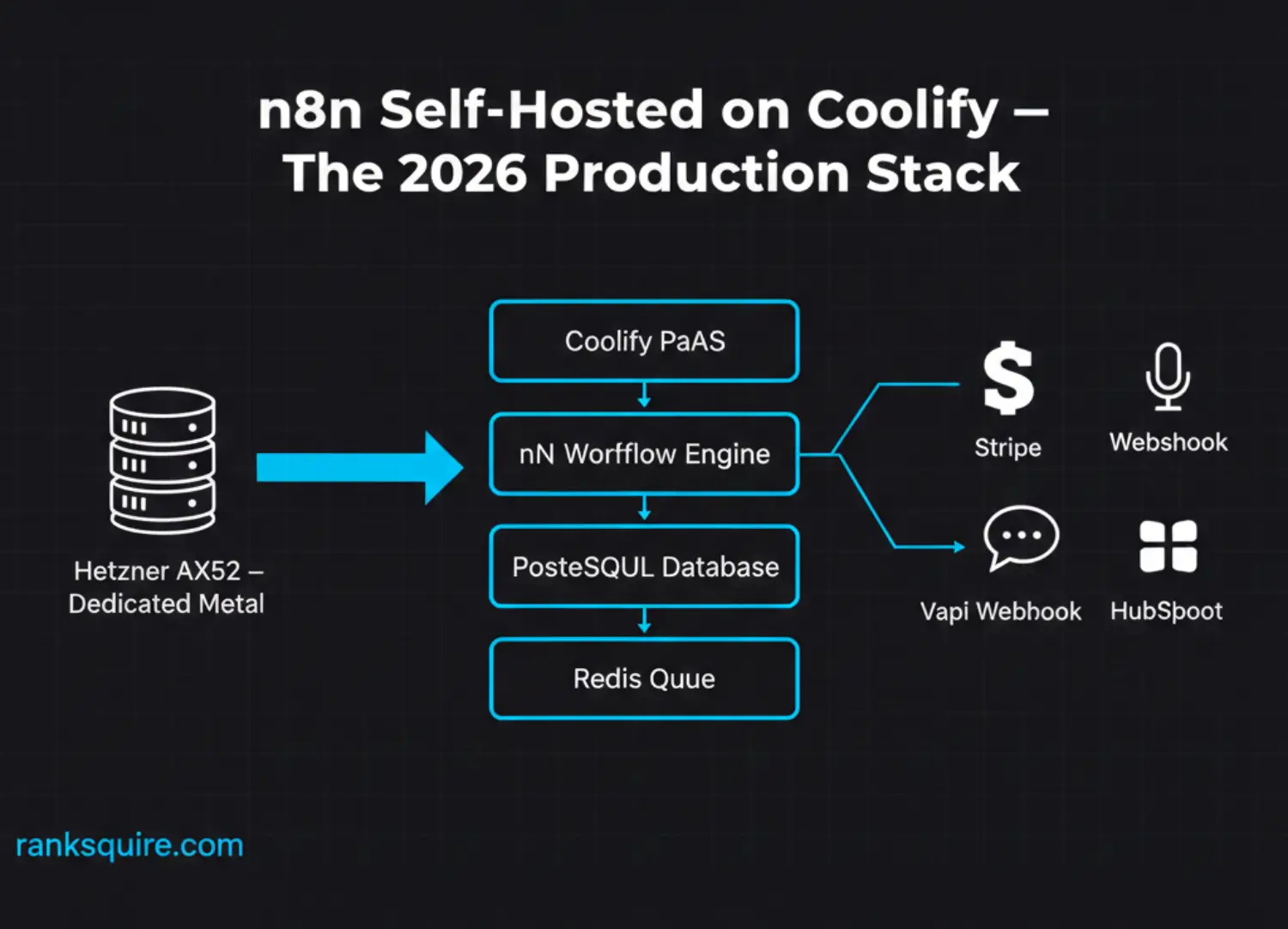
| Enterprise | 1,000,000+ executions/month. AI agents, vector databases, Queue Mode workers. | Dedicated Ryzen 9 / 64GB RAM — Hetzner AX52 | ~$65/month |
Critical storage note: Always provision NVMe SSD storage. If you are running Qdrant alongside your n8n self-hosted instance for vector memory in AI agent pipelines as described in the Sovereign Stack pillar vector search performance is I/O bound. A spinning HDD under Qdrant produces query latency that makes AI agents appear broken. NVMe is not optional at enterprise scale.
Why Hetzner specifically for n8n self-hosted deployments: The AX-series dedicates full hardware to your server. You are not sharing CPU cores with hundreds of other tenants on a hypervisor. Every workflow execution gets real CPU cycles. This is the difference between a recursive chain that completes in four hours and one that times out at hour three.
Who this tier matters for Real Estate, B2B Agencies, and Financial Firms: A Real Estate brokerage processing 80,000 lead enrichment records monthly through an n8n self-hosted recursive pipeline requires the Enterprise tier. A B2B Agency running CRM migration loops for clients requires the Pro tier minimum. A Financial Firm processing compliance documents through AI extraction pipelines with HITL governance requires the Enterprise tier with dedicated compute shared VPS resources introduce timing unpredictability that compliance architectures cannot tolerate.
5. PHASE 2: HOST SETUP PREPARING THE SERVER
This n8n self-hosted tutorial assumes a fresh Ubuntu 24.04 LTS server. Do not attempt this on an existing production server with other applications running. Start clean.
Step 1: SSH into your server
ssh root@your-server-ipStep 2: Update and upgrade all packages
apt update && apt upgrade -yRun this before anything else. Outdated system packages are the most common source of Docker networking issues on fresh Hetzner instances.
Step 3: Install Coolify
Coolify’s installer handles everything: Docker Engine, Docker Compose, the Traefik reverse proxy, and the Coolify application itself. One command installs the entire stack.
curl -fsSL https://cdn.coollabs.io/coolify/install.sh | bashInstallation takes five to ten minutes depending on your server’s download speed. When complete, the terminal will display your dashboard URL in the format: http://your-server-ip:8000
Step 4: Access the Coolify dashboard
Navigate to that URL in your browser. Create your admin account. You now have a private Platform-as-a-Service running on hardware you own. This is the foundation every other service in your self-hosted n8n stack deploys on top of.
6.PHASE 3: DEPLOYING N8N ON COOLIFY
Coolify’s n8n template makes deployment point-and-click, but the environment variable configuration is where most n8n self-hosted tutorials fail their readers. These values must be correct before you click Deploy.
Step 1: Create a project
In the Coolify dashboard, click + New Project → name it Production → click Continue.
Step 2: Add n8n as a service
Click + New Resource → select Service → search for n8n → select the official n8n template.
Step 3: Configure the service
Set the service name to n8n-production.
For the Docker image, use docker.n8n.io/n8nio/n8n:latest to start. In production, pin to a specific version tag such as :1.45.0 — this prevents an upstream release from breaking your workflows during a routine Coolify redeploy.
Step 4: Set environment variables
These are the critical environment variables for a production n8n self-hosted setup. Set all of them before clicking Deploy.
N8N_ENCRYPTION_KEY=your-random-32-character-string
WEBHOOK_URL=https://n8n.your-domain.com/
GENERIC_TIMEZONE=America/New_York
N8N_HOST=n8n.your-domain.com
N8N_PORT=5678
N8N_PROTOCOL=https
The N8N_ENCRYPTION_KEY warning: This key encrypts every credential stored in your n8n instance API keys, OAuth tokens, database passwords. If you lose this key and your container is destroyed, every credential is permanently unrecoverable. Store this key in a password manager the moment you generate it. This is not recoverable. There is no reset.
Step 5: Deploy
Click Deploy. Coolify pulls the Docker image and starts the container. The first deployment takes two to three minutes.
7. PHASE 4: NETWORKING AND DNS
A self-hosted n8n instance without HTTPS is incomplete. You cannot receive production webhooks from Stripe, Vapi, HubSpot, or any serious API without a valid SSL certificate. Coolify automates this entirely via Let’s Encrypt and the Traefik proxy it installs during setup.
Step 1: Create the DNS A record
Log into your domain registrar Cloudflare, Namecheap, or wherever your domain DNS is managed.
Create an A record:
- Host:
n8n - Value: Your server’s IP address
- TTL: Automatic or 300 seconds
This creates the subdomain n8n.your-domain.com pointing to your Hetzner server.
Step 2: Configure the domain in Coolify
In your n8n service configuration in Coolify, find the Domains field. Enter: https://n8n.your-domain.com
Click Save and then Redeploy.
Traefik detects the domain, contacts Let’s Encrypt, and provisions the SSL certificate automatically. This takes approximately 60 seconds after DNS propagation.
Step 3: Verify the deployment
Navigate to https://n8n.your-domain.com in your browser. You should see the n8n account setup screen with a valid SSL padlock. Your n8n self-hosted instance is now accessible over HTTPS.
If you see a certificate error rather than a padlock, wait five minutes for DNS to propagate globally and refresh.
8. PHASE 5: POSTGRES AND QUEUE MODE
The default n8n installation uses SQLite as its execution database. SQLite is acceptable for a developer testing environment processing under 1,000 executions per month. For any production n8n self-hosted deployment handling real business workloads, SQLite will fail under concurrent load due to write locking. You need Postgres.
Step 1: Deploy Postgres in Coolify
In your Production project in Coolify, click + New Resource → select Database → select PostgreSQL.
Set a strong password and note the automatically generated username and database name. Click Deploy.
Step 2: Connect n8n to Postgres
Go to your n8n service configuration. Add the following environment variables, replacing the placeholder values with the actual values from your Postgres service:
DB_TYPE=postgresdb
DB_POSTGRESDB_HOST=your-postgres-container-hostname
DB_POSTGRESDB_PORT=5432
DB_POSTGRESDB_DATABASE=your-database-name
DB_POSTGRESDB_USER=your-postgres-username
DB_POSTGRESDB_PASSWORD=your-postgres-password
The hostname for the Postgres container uses Coolify’s internal Docker network DNS. It will look like postgresql-production-abc123 find the exact value in your Postgres service’s connection details tab within Coolify.
Click Redeploy on your n8n service.
Step 3: Enable Queue Mode with Redis
Queue Mode is what separates a hobbyist n8n self-hosted installation from an enterprise-grade automation platform. In Queue Mode, n8n splits into two components: the Main process that receives webhooks and manages the UI, and Worker processes that execute workflows. Redis acts as the message broker between them.
Without Queue Mode, a single slow workflow execution blocks every other execution waiting in line. With Queue Mode running four workers on a Hetzner AX52, you process four workflows simultaneously with each worker independently consuming from the Redis queue.
Deploy Redis in Coolify the same way you deployed Postgres: + New Resource → Database → Redis.
Add these environment variables to your n8n service:
EXECUTIONS_MODE=queue
QUEUE_BULL_REDIS_HOST=your-redis-container-hostname
QUEUE_BULL_REDIS_PORT=6379
To add worker instances, deploy additional n8n containers using the same image and environment variables, but set N8N_WORKER_PROCESS_INSTEAD_OF_MAIN=true on the worker containers.
Redeploy. Your n8n self-hosted stack is now running in Queue Mode.
9. PHASE 6: MAINTENANCE AND SECURITY
Self-hosting n8n on Coolify means you are the infrastructure team. These operational practices are not optional at enterprise scale.
Updating n8n
To update to a new n8n version, go to your n8n service in Coolify, update the image tag from the current version to the new version (for example from :1.45.0 to :1.46.0), and click Redeploy. Coolify performs a rolling restart: the new container starts before the old one stops, eliminating downtime for most updates.
Always review the n8n release notes before updating in production. Breaking changes in major version bumps particularly around credential encryption and node API changes can affect existing workflows.
Automated Postgres backups
In Coolify, go to your Postgres service → click Backups → configure an S3-compatible destination (AWS S3 or self-hosted MinIO both work) → set a daily schedule. A production n8n self-hosted deployment without automated database backups is not a production deployment. It is a liability waiting for the wrong moment.
Security hardening
Configure Coolify’s server firewall to allow inbound traffic only on ports 80, 443, and 22. Block everything else. Your n8n instance is only accessible via the HTTPS domain direct port access to 5678 should be blocked at the firewall level.
Enable two-factor authentication on your n8n admin account immediately after setup. n8n’s built-in authentication handles user access; Coolify handles infrastructure access. Both require 2FA in a production environment.
10. CONNECTING YOUR ECOSYSTEM
A self-hosted n8n instance is the execution engine. What you run on it determines its value.
For high-volume data processing: Your Hetzner server running n8n in Queue Mode can now handle recursive workflows that would crash any SaaS automation platform. Read the complete guide to n8n Recursive Workflows: The 2026 Loop Guide to implement the Pagination Loop and Agentic Retry Loop patterns on your new infrastructure.
For webhook integrations: Your n8n self-hosted instance receives production webhooks over HTTPS at scale. The n8n Webhook Response Library documents the exact JSON structures from Stripe, Vapi, HubSpot, and twelve other production APIs ready to map directly into your Postgres database.
For infrastructure context: This guide implements one component of the full sovereign stack. The Enterprise AI Infrastructure 2026: The Sovereign Stack pillar documents how n8n, Qdrant, Postgres, and Coolify work together as an integrated enterprise AI platform.
11. CONCLUSION: YOU ARE NOW THE INFRASTRUCTURE TEAM
Completing this n8n self-hosted tutorial marks a transition. You have moved from renting execution capacity from SaaS vendors to owning the infrastructure that runs your automation stack.
The Hetzner server running Coolify is yours. The Postgres database holding your execution history is yours. The Redis queue processing your webhooks is yours. No vendor can raise prices, change terms, or throttle your workflows. You control the metal.
The stack you have built in this guide n8n in Queue Mode, backed by Postgres, deployed on Coolify, running on dedicated hardware is the same architecture enterprise automation teams pay consultants $50,000 to design. You built it in 90 minutes for $65 per month.
Start the machines.
FREQUENTLY ASKED QUESTIONS: N8N SELF-HOSTED TUTORIAL
What is the minimum server spec to self-host n8n on Coolify in 2026?
The minimum viable server for a production n8n self-hosted deployment is 2 vCPU and 4GB RAM a Hetzner CPX31 at approximately $15 per month. This handles up to 10,000 executions per month with simple linear workflows. Below 4GB RAM, n8n will begin swapping to disk under load and execution times will degrade. For AI agent workflows processing large JSON payloads or calling vector databases, the minimum practical spec is 8GB RAM.
How long does the full Coolify n8n self-hosted setup take?
From a fresh Ubuntu 24.04 server to a running n8n instance with HTTPS takes approximately 30 to 45 minutes. Adding Postgres and Redis and enabling Queue Mode takes an additional 30 to 45 minutes. The complete production setup described in this guide including firewall configuration and backup scheduling takes under 90 minutes for someone following the steps for the first time.
What is Queue Mode and do I need it for my n8n self-hosted setup?
Queue Mode separates n8n into a Main process that handles the UI and webhook reception and Worker processes that execute workflows. Without Queue Mode, all executions run in the Main process and compete for the same CPU and memory. With Queue Mode, each worker independently processes executions from the Redis queue. You need Queue Mode if you receive concurrent webhooks, run recursive workflows, or process more than 1,000 executions per day. At enterprise scale it is not optional.
How do I update n8n without downtime on a self-hosted Coolify deployment?
Update the Docker image tag in your n8n service configuration in Coolify from the current version to the target version and click Redeploy. Coolify performs a rolling restart by default the new container starts and passes health checks before the old container is stopped. For zero-downtime updates, ensure your n8n service has at least two replicas configured in Coolify. Single-replica deployments will have a gap of approximately 30 seconds during the restart.
Can I self-host n8n on Coolify without a domain name?
You can access n8n via its IP address on port 5678 without a domain, but this configuration does not support HTTPS and therefore cannot receive webhooks from production APIs. Stripe, Vapi, and most enterprise APIs require HTTPS endpoints for webhook delivery. A domain and SSL certificate are required for any self-hosted n8n deployment receiving external webhook traffic.
How is a self-hosted n8n on Coolify different from n8n Cloud?
n8n Cloud charges per execution and per active workflow, manages infrastructure on your behalf, and caps execution history based on your plan tier. Self-hosted n8n on Coolify has zero per-execution cost, unlimited active workflows, configurable execution history retention, and full access to your Postgres database for direct queries. The trade-off is that you are responsible for uptime, updates, backups, and security. For teams processing more than 50,000 executions per month, the self-hosted cost advantage becomes decisive.
What happens to my n8n workflows if the Coolify server goes down?
In Queue Mode with Redis persistence enabled, any executions that were queued but not yet started when the server went down are preserved in Redis and resume when the server restarts. Executions that were actively running when the crash occurred will show as failed in the execution log and must be retried manually or via an error-triggered workflow. This is why external cursor persistence to Postgres is recommended for recursive workflows processing large datasets see the n8n Recursive Workflows guide for the implementation pattern.
Is self-hosting n8n on Coolify suitable for GDPR or HIPAA compliance?
Self-hosting n8n on a dedicated Hetzner server in a compliant data center region is a prerequisite for GDPR compliance, not a guarantee of it. Hetzner operates data centers in the EU (Falkenstein, Nuremberg, Helsinki) that satisfy GDPR data residency requirements. HIPAA compliance requires additional controls including encryption at rest, audit logging, access controls, and a Business Associate Agreement with your hosting provider. Coolify’s architecture supports all of these controls at the infrastructure level, but their correct configuration is the operator’s responsibility.
FROM THE ARCHITECT’S DESK
I recently audited a B2B Agency in London running n8n on a shared $5 VPS with SQLite and no Queue Mode. They were processing CRM enrichment workflows for three enterprise clients 60,000 records per client per month. The instance was crashing every four days.
Their diagnosis was that n8n was unreliable. Their proposed solution was to move back to Zapier at $899 per month.
The actual problem was a 2GB RAM VPS with SQLite locking under 40 concurrent writes and no Redis queue to absorb the webhook spikes from three simultaneous client pipelines.
We migrated the stack in one afternoon. A Hetzner CPX41 4 vCPU, 8GB RAM, NVMe SSD at $30 per month. Coolify installed in eight minutes. n8n redeployed with Postgres replacing SQLite. Redis added and Queue Mode enabled with two worker containers. Firewall locked to ports 80, 443, and 22.
The results:
The instance has not crashed once in four months of continuous operation. All three client pipelines run simultaneously without a single execution lock. The webhook queue absorbs spikes without dropping a record. The entire infrastructure costs $30 per month $869 per month less than the Zapier plan they were about to purchase.
They did not need a different automation tool. They needed better infrastructure. They needed sovereignty.
That is what a self-hosted n8n deployment looks like when it is built by an Architect rather than assembled by someone who copied a Docker Compose file from a Reddit thread.
The Sovereign Stack Toolkit
The exact tools that replace a $500/month n8n Cloud bill with a $65/month dedicated server — deployed in one afternoon, running in production the following morning.
This is the server the entire stack runs on. AMD Ryzen 9 processor, 64GB ECC RAM, NVMe storage — for $65 per month flat. Not per execution. Not per workflow. Not per webhook. Flat. Whether your n8n self-hosted instance processes 100,000 executions this month or 1,000,000, this bill does not move. Hetzner operates data centers in Germany, Finland, and the US — Real Estate teams choose their jurisdiction, Financial Firms choose the EU for GDPR data residency, B2B Agencies pick the region closest to their client base.
💰 Saves: Up to $435/month vs n8n Cloud at 100k executions — permanently Best for: Any organization past 50,000 executions per month that needs a fixed-cost compute foundation for self-hosted n8n. View Server →Coolify is why this n8n self-hosted tutorial takes 90 minutes instead of three days. It installs Docker, Traefik, and a full deployment GUI on your Hetzner server in one command. From that point forward you manage n8n deployments, environment variables, SSL certificates, and rolling restarts from a browser interface — not a terminal. The engineers who told you self-hosting was too complex had not used Coolify. One competent developer. One afternoon. Your entire n8n self-hosted stack live in production.
💰 Cost: Free and open source — runs on the server you already paid for Best for: Technical teams who want Vercel-level deployment simplicity on Hetzner-level infrastructure cost. View Tool →The self-hosted version of n8n runs under the fair-code license — unlimited workflows, unlimited executions, full source access, zero execution fees. Every workflow is a JSON file you commit to version control. Full Python and JavaScript code nodes. No 30-second execution timeout — a recursive loop processing 80,000 lead records runs to completion on your hardware at the speed your server allows, not the speed a SaaS vendor allocates to your tenant. This is the automation engine. Everything else in this toolkit exists to run it correctly.
💰 Saves: $300–$500/month vs n8n Cloud at 100k executions Best for: Every organization past 50,000 executions per month running AI agent workflows, recursive data pipelines, or compliance-sensitive automation. View Docs →The default n8n self-hosted installation uses SQLite. SQLite locks under concurrent writes. At 1,000 executions per day with multiple workers processing simultaneously, SQLite is a liability waiting for a 2 AM incident. Postgres handles concurrent writes at any volume, gives your compliance team a queryable execution history, and deploys in Coolify with a single click. Every enterprise n8n self-hosted deployment runs Postgres. This is not optional at production scale.
💰 Cost: Free and open source — deploys as a Coolify container Best for: Any n8n self-hosted deployment processing more than 1,000 executions per day or running multiple concurrent workers in Queue Mode. View Tool →Most people run n8n self-hosted in standard mode and wonder why it struggles at volume. The answer is Queue Mode — and Queue Mode requires Redis. Redis separates the webhook receiver from the execution workers, allowing your Hetzner hardware to run as many worker containers as it has CPU cores to support. Need to absorb a spike of 10,000 webhooks in five minutes from a Stripe event? Redis queues every one. Workers drain the queue. Not a single execution is lost. No rate limit. No timeout. No SaaS vendor throttle.
💰 Cost: Free and open source — runs as a Docker container on the same Hetzner server Best for: Any n8n self-hosted deployment processing more than 100,000 executions per month or handling unpredictable webhook volume spikes. View Tool →Coolify’s built-in Postgres backup system supports S3-compatible destinations. MinIO gives you that destination on hardware you control — no AWS account, no Google Cloud billing, no data leaving your jurisdiction. For Financial Firms with data residency requirements and Real Estate operations with client PII in their execution database, MinIO closes the last gap in the sovereign stack. Your n8n self-hosted execution history backs up daily to a storage bucket you own, in a jurisdiction you chose, on a server that costs you nothing additional beyond what you already run.
💰 Cost: Free and open source — runs on a second Hetzner instance at $5/month Best for: Organizations with GDPR, HIPAA, or internal data residency requirements that cannot allow execution history to leave their chosen jurisdiction. View Tool →Stop paying the execution tax.
Own the infrastructure instead.
You have read the guide. Now build it correctly — without the risk of doing it wrong at 2 AM.
You now have every environment variable, every command, and every architectural decision documented. The question is not whether the migration is worth doing. The question is whether one misconfigured Redis connection string or one missed firewall rule is going to cost you more in downtime than you save in the first quarter.
Whether you are running a Real Estate operation processing tens of thousands of leads through AI enrichment pipelines, a B2B Agency with GDPR obligations on client automation data, or a Financial Firm that needs audit trails on every execution — I will architect, deploy, and hand over your sovereign n8n self-hosted infrastructure in 30 days. Not a template. A bespoke stack built around your execution volume, your data residency requirements, and your specific workflow logic.
- Current automation audit — every workflow mapped, categorized, and prioritized for migration
- Hetzner server provisioned, hardened, and Coolify-deployed in your chosen jurisdiction
- n8n self-hosted in Queue Mode with Redis — all high-volume workflows migrated and validated in parallel
- Postgres replacing SQLite — full execution history migrated with zero data loss
- MinIO backup configured — daily automated backups to sovereign storage
- Full handover documentation and 30 days post-deployment support
Calculate Your Execution Tax.
Then Eliminate It.
You are not paying $500 a month for software.
You are paying $500 a month for the privilege of running a growing automation stack
while a SaaS vendor’s billing model treats every execution as a revenue opportunity.
Here is what that decision costs at scale — in real numbers, not projections.
We deploy sovereign n8n self-hosted infrastructure for Real Estate operations, B2B Agencies, and Financial Firms. We handle the server provisioning, the security hardening, the Coolify deployment, the Postgres migration, the Queue Mode configuration, and the Redis setup. You get a fully operational sovereign stack — handed over, documented, and supported for 30 days. You keep the savings from month one forward.
- Full automation audit before a single line of infrastructure is touched
- Hetzner + Coolify + n8n + Postgres + Redis deployed in your jurisdiction in 30 days
- All workflows migrated, tested, and running in parallel before cutover — zero downtime
- MinIO sovereign backup configured — execution history never leaves your jurisdiction
- 85% average reduction in automation infrastructure cost within first 30 days