
Qdrant Cloud Pricing 2026: Free Tier to Self-Hosted The Complete Cost Breakdown
That is not an opinion. It is the arithmetic of Qdrant Cloud pricing versus self-hosted Qdrant on a $96/month DigitalOcean Droplet and the exact numbers have not been published anywhere until now.
- The free tier — exactly what 1GB RAM and 4GB disk can hold
- The standard tier — how hourly billing works at production scale
- The RAM-per-million-vectors table every engineer needs before choosing a plan (no one publishes this)
- The exact $96/month self-hosted crossover calculation
- When Qdrant Cloud makes sense vs when self-hosted wins every time
- The production decision framework: 5 questions, one answer
Quick Answer — Qdrant Cloud Pricing 2026
Infrastructure Intelligence Report
Key Takeaways
EXECUTIVE SUMMARY: THE QDRANT PRICING DECISION
Teams evaluating Qdrant Cloud pricing in 2026 are asking the wrong question. “How much does Qdrant Cloud cost?” is the wrong question. The right question is: “At what vector count and write frequency does Qdrant Cloud cost more than running Qdrant on infrastructure I own?” That question has a specific, calculable answer — and it determines whether you are on the right side of a $200/month cost difference.
From treating vector database pricing as a SaaS subscription to evaluating it as an infrastructure cost decision with a clear crossover point. Qdrant Cloud charges for allocated cluster resources. Self-hosted Qdrant charges for the server. At a specific cluster size, those costs are equal. Above that size, self-hosted is cheaper.
A pricing decision that is made once, with full information, before you build the production system — not after the first month-three billing review when the cluster has grown and migration is expensive.
2026 Qdrant Pricing Law
The correct Qdrant deployment model is the one whose monthly cost at your production vector count and write frequency is lower — plus operational overhead. At vector counts above the self-hosting crossover, the infrastructure savings pay for the engineering time to set it up within 30 days.
Table of Contents

1. Qdrant Cloud Pricing Tiers 2026 Complete Breakdown
Infrastructure Catalog 2026
Qdrant Cloud Pricing Analysis
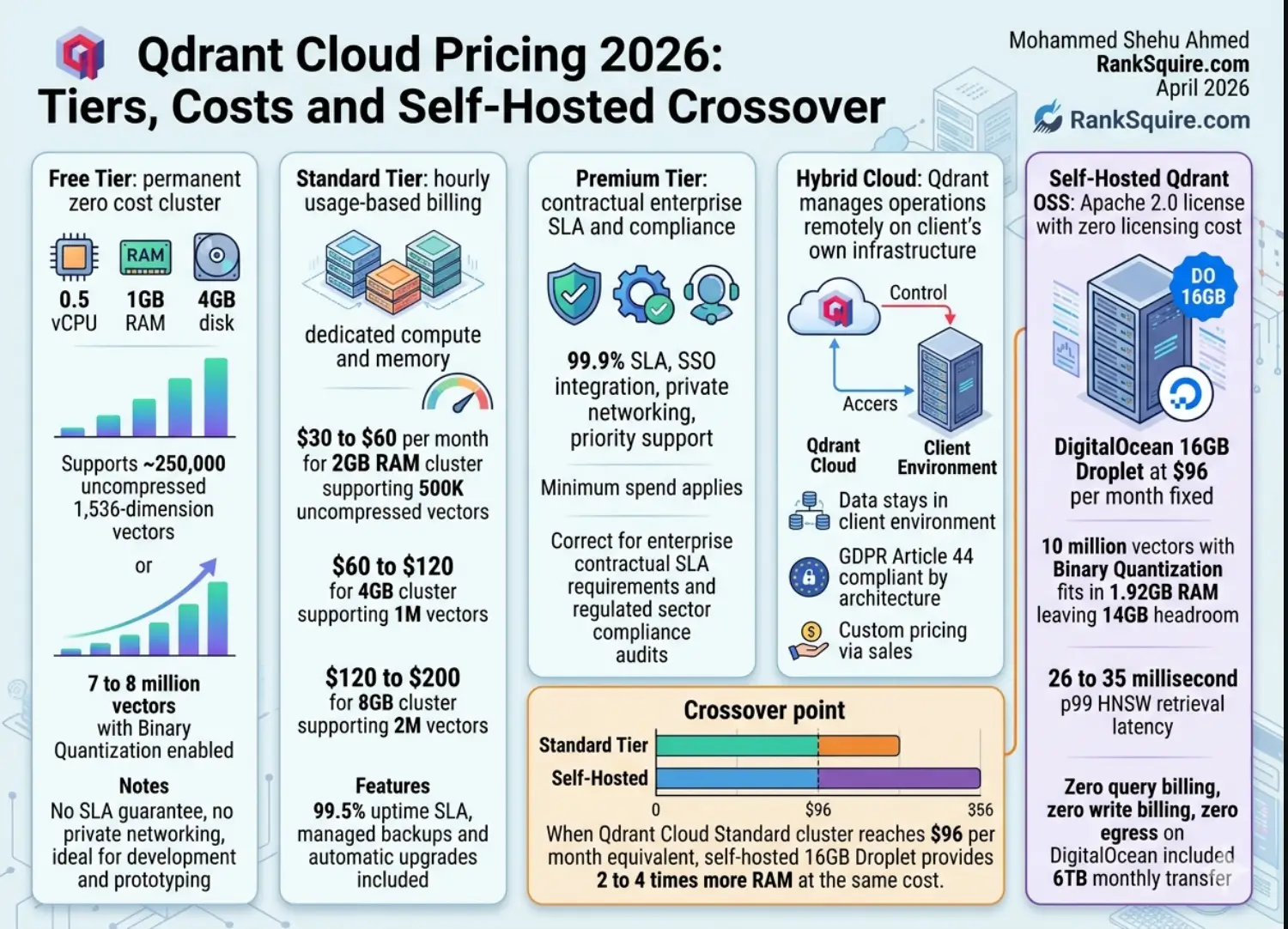
FREE (Permanent — No Credit Card Required)
Nodes: 1 (single-node, no replication) | SLA: None (best-effort)
What the free tier can hold:
- ~250,000 uncompressed 1,536-dim vectors (6 bytes × 1,536 × 250K ≈ 2.4GB — disk limited)
- ~7–8 million vectors with Binary Quantization enabled (32× compression)
- ~1 million vectors with Scalar Quantization (4× compression)
Free tier breaks for production when:
- Vector count exceeds disk capacity (4GB fills within days for any AI agent system at production write frequency)
- Your system needs replication for high availability
- You need private networking (free tier is public internet only)
- You require a 99%+ uptime SLA
Free tier is correct for:
Development, prototyping, SDK evaluation, demo builds, and any use case where 1GB RAM is sufficient and downtime during a cluster restart is acceptable.
- Free cloud inference for selected embedding models (Qdrant added this in 2026 — generate embeddings and run vector search in Qdrant Cloud without a separate embedding pipeline)
STANDARD (Production Workloads)
How the billing works:
Standard tier charges by the hour for the resources allocated to your cluster. You pay for what is provisioned, not for query volume. No per-query billing. No per-write billing.
Estimated monthly costs at common cluster sizes:
(These are directional estimates — verify with Qdrant’s calculator)
- Approximate: $30–60/month (varies by region)
- Vector capacity: ~500K uncompressed or ~16M with Binary Quantization
- Correct for: small-to-medium RAG systems, single-agent memory
- Approximate: $60–120/month
- Vector capacity: ~1M uncompressed or ~32M with Binary Quantization
- Correct for: medium production systems, 3–5 agent teams
- Approximate: $120–200/month
- Vector capacity: ~2M uncompressed or ~64M with Binary Quantization
- This is the crossover zone — self-hosted begins competing here
- Approximate: $200–400/month (region-dependent)
- Crossover exceeded — self-hosted at $96/month saves $100–300/month
Standard tier includes:
- Managed backups/snapshots
- Automatic version upgrades
- Horizontal scaling
- Multi-cloud availability
PREMIUM (Enterprise + Regulated Workloads)
SLA: 99.9% uptime | Billing: Custom — minimum spend requirement applies
Features: SSO, private networking, priority support, dedicated account management
Compliance: SOC 2 Type II, GDPR data processor
When to use Premium:
- Contractual SLA requirement (99.9% is the threshold for enterprise)
- Private networking required (no public internet routing)
- SSO with enterprise identity provider required
- Regulated sector compliance audit trail required
When Premium is NOT the answer:
If data residency requires data to stay in your infrastructure — Premium is still Qdrant’s cloud. For true data residency, use Hybrid Cloud or self-hosted.
HYBRID CLOUD (Your Infrastructure, Qdrant Managed)
What it is: Qdrant runs on your own infrastructure (AWS, GCP, Azure, DigitalOcean, on-premise) while Qdrant’s team manages the operational aspects — upgrades, monitoring, and support.
Cost: Custom — contact Qdrant sales | Data: Stays in your infrastructure
Use case:
Regulated workloads (HIPAA, GDPR Article 44) that need professional operational management without full self-hosting.
Data never leaves your environment. Only operational management signals go to Qdrant. This is architecturally compliant for GDPR Article 44 data residency requirements — unlike standard Qdrant Cloud where data is in Qdrant’s infrastructure.
2. The RAM-Per-Million-Vectors Table (The Number Nobody Publishes)
How much RAM does my vector count need?
This is the table that should be on every Qdrant pricing page — but is not. These are calculated values verified against Qdrant’s documented storage behavior.
| Vectors | Uncompressed | Scalar Quant | Binary Quant | Infrastructure |
|---|---|---|---|---|
| 100,000 | 614 MB | 153 MB | ~19 MB | Free tier ✓ |
| 500,000 | 3.07 GB | 767 MB | ~96 MB | 2GB cluster |
| 1,000,000 | 6.14 GB | 1.54 GB | ~192 MB | 4GB cluster |
| 2,000,000 | 12.3 GB | 3.07 GB | ~384 MB | 8GB cluster |
| 5,000,000 | 30.7 GB | 7.67 GB | ~960 MB | 16GB cluster |
| 10,000,000 | 61.4 GB | 15.4 GB | ~1.92 GB | 16GB DO ✓ (BQ) |
| 50,000,000 | 307 GB | 76.7 GB | ~9.6 GB | 64GB+ cluster |
| 100,000,000 | 614 GB | 153 GB | ~19.2 GB | Multi-node |
Three Critical Rules
10 million vectors with BQ fits in 1.92GB RAM on a single Droplet. Without BQ, 10 million vectors needs 61GB RAM — a $400+/month cluster. BQ maintains 95%+ recall for standard embedding models.
The table shows vector storage only. HNSW graph nodes add approximately 20–30% overhead. Budget accordingly. Rule of thumb: RAM needed = (vector RAM from table) × 1.3
Each vector’s metadata payload (agent_id, timestamp, domain_tag, etc.) adds approximately 500 bytes–2KB per record. At 1M vectors with 1KB payloads: 1GB additional storage.
Which Qdrant Plan Do You Need?
3. The $96/Month Self-Hosted Crossover Calculation
Managed vs. Self-Hosted: The Crossover Math
This is the number nobody publishes. Here is the exact math.
Qdrant Cloud Standard (4GB)
- Base cluster cost: ~$80–120/month
- Data transfer: Included (within limits)
- Managed backup: Included
- Operational overhead: $0
- Total: ~$80–120/month
DigitalOcean Droplet (16GB)
- Droplet cost: $96/month fixed
- Qdrant OSS license: $0 (Apache 2.0)
- Data transfer: 6TB/month included
- Ops overhead: ~1 hour/month maintenance
- Total: $96/month + engineer time
THE CROSSOVER:
Qdrant Cloud Standard 4GB: ~$80–120/month for the cluster
Self-hosted DO 16GB: $96/month — holds 16× more vectors
Qdrant Cloud: requires 2GB+ cluster → $60–120/month
Self-hosted DO 16GB with BQ: $96/month — holds 10M vectors with headroom
WHAT THE CROSSOVER MEANS IN PRACTICE:
- Start on free tier during development (zero cost)
- Upgrade to Standard 2GB cluster when you need production reliability
- At the moment your Standard cluster cost approaches $80/month — evaluate the self-hosted migration
- The migration takes one engineer one day
- If you are paying $300+/month: self-hosted Qdrant saves you $200+/month = $2,400+/year
- Migration cost: 1–2 engineer days
- Payback period: 30–45 days at $200/month savings
4. Qdrant Cloud vs Pinecone vs Weaviate: Pricing Comparison
Three vector databases. Three billing models. One AI agent system at production scale.
Qdrant Cloud Standard
Cluster cost: ~$80–160/month (dedicated, hourly billing)
Query billing: $0 (no per-query charges)
Write billing: $0 (no per-write charges)
Egress: Included in Qdrant Cloud limits
Pinecone Serverless
Storage: 2M × $3.60/GB/month (compressed ~$7/month)
Write units: 1.5M writes/mo × 4 units × $0.0000004 = $2.40/month
Read units: 600K queries/mo × 2 units × $0.00000025 = $0.30/month
Base fee: $50/month minimum (Standard plan)
NOTE: Pinecone scales non-linearly. Read units can exceed $4,000/mo at 50M queries.
Weaviate Cloud
Pricing: serverless consumption-based
Estimated for 2M vectors, 20K queries/day: ~$100–200/month
No published per-query pricing formula — contact sales for quote
Qdrant Self-Hosted (DO 16GB)
Infrastructure: $96/month fixed
Queries: $0 at any volume
Writes: $0 at any volume
Egress: 6TB/month included — $0 at AI agent scale
PRICING VERDICT BY SCENARIO
- Qdrant Cloud free tier OR Pinecone free tier
- Both work. Qdrant free tier is permanent. Pinecone free tier has limits.
- Qdrant self-hosted ($96/month) → wins on write-heavy workloads
- Qdrant Cloud Standard ($80–160/month) → comparable, zero ops overhead
- Pinecone ($60–100/month at this scale) → competitive but non-linear risk
- Qdrant self-hosted → decisive winner
- Pinecone → read unit costs become the dominant expense
- Qdrant Cloud → multi-node cluster required, cost rises steeply
- Any per-write-billing database is the wrong architectural choice
- Qdrant (cloud or self-hosted) — correct by design
5. When Qdrant Cloud Makes Sense (and When It Does Not)
Deployment Logic: Managed Cloud vs. Self-Hosted
- Your team has zero DevOps capacity and cannot manage a Linux server
- You need 99.5%–99.9% uptime SLA backed by a contract
- You need professional support response times (hours, not community forums)
- You are in active development and need to iterate cluster size without infrastructure management
- You are pre-product and $96/month operational certainty is worth more than $96/month infra savings
- You need automatic Qdrant version upgrades (v1.17 → v1.18 without downtime)
- Your data cannot leave your infrastructure (GDPR Article 44 hard requirement, HIPAA PHI processing, financial sector data residency)
- Self-hosted or Hybrid Cloud is the only architecturally correct answer
- Your monthly Qdrant Cloud Standard cost exceeds $96/month
- Self-hosted on DigitalOcean gives you MORE RAM for equal or lower cost
- Your AI agent system writes more than 50,000 vectors/day
- Write frequency is the cost driver. Qdrant Cloud charges for cluster size (not writes), but clusters need to grow with write volume. Self-hosted stays at $96/month fixed regardless of write volume.
- Your vector count will exceed 5M in the next 90 days
- Plan the infrastructure architecture now. Migrating from cloud to self-hosted under production load is the most expensive engineering time you will spend in Year 1.
- You want full control over Qdrant version pinning
- Qdrant Cloud auto-upgrades. Self-hosted lets you test v1.18 before upgrading production from v1.17.
- Any data sovereignty or compliance requirement exists
- Your cluster cost would exceed $96/month
- Your team has basic Linux/Docker skills (2 hours of setup)
- Write volume is high (AI agent memory systems)
- You want zero egress fees on vector data transfers
- You need to pin to a specific Qdrant version for production stability
6. Self-Hosted Qdrant Setup: The $96/Month Configuration
The production configuration in 6 commands
This section gives you the exact setup — not a tutorial, not a walkthrough.
systemctl enable –now docker
-p 6333:6333 -p 6334:6334 \
-v /var/lib/qdrant/storage:/qdrant/storage \
-v /var/lib/qdrant/snapshots:/qdrant/snapshots \
-e QDRANT__SERVICE__API_KEY=your-secure-api-key \
qdrant/qdrant:v1.17.0
from qdrant_client import QdrantClient
from qdrant_client.http import models
client = QdrantClient(host=”localhost”, port=6333,
api_key=”your-secure-api-key”)
client.create_collection(
collection_name=”agent_memory”,
vectors_config=models.VectorParams(
size=1536, distance=models.Distance.COSINE),
hnsw_config=models.HnswConfigDiff(
m=16, ef_construction=200),
quantization_config=models.BinaryQuantization(
binary=models.BinaryQuantizationConfig(always_ram=True)),
)
EOF
from qdrant_client.http import models
# (client already initialized above)
for field, schema in [
(“agent_id”, models.PayloadSchemaType.KEYWORD),
(“domain_tag”, models.PayloadSchemaType.KEYWORD),
(“is_superseded”, models.PayloadSchemaType.BOOL),
(“timestamp_unix”,models.PayloadSchemaType.INTEGER),
]:
client.create_payload_index(
collection_name=”agent_memory”,
field_name=field, field_schema=schema)
EOF
WHAT YOU GET FOR $96/MONTH:
Vector Database Pricing Series · RankSquire 2026
The Complete Vector Database Cost Library
Every pricing breakdown, crossover calculation, and cost comparison you need to make the right vector database decision for your AI agent system.
Qdrant Cloud Pricing 2026: Tiers, Costs and Self-Hosted Crossover
Free tier limits, standard tier costs, the RAM-per-million-vectors table nobody publishes, and the exact $96/month self-hosted crossover calculation.
Vector Database Pricing Comparison 2026: All 6 Databases
Pinecone, Qdrant, Weaviate, Chroma, pgvector and Milvus — full TCO at three scales. The $300/month migration trigger explained.
Read Entry → 📊 Pinecone CostPinecone Pricing 2026: True Cost, Free Tier and Pod Crossover
The exact Pinecone write unit + read unit + storage formula. Why $300/month is the migration trigger to self-hosted Qdrant.
Read Entry → ⭐ PillarBest Vector Database for AI Agents 2026: Full Ranked Guide
Qdrant, Weaviate, Pinecone, Chroma, pgvector, Milvus ranked across 6 production criteria for agentic workloads.
Read Entry → 🧠 MemoryAgent Memory vs RAG: What Breaks at Scale 2026
Where Qdrant’s write-heavy agent memory architecture beats RAG retrieval patterns — and the failure cliff every team hits at 10K interactions.
Read Entry →Weaviate Cloud Pricing 2026: Tiers, Costs and Qdrant Comparison
The Weaviate Cloud pricing breakdown with the same crossover calculation methodology used for Qdrant.
7. Conclusion
The Qdrant Deployment Verdict
Qdrant Cloud pricing in 2026 is a decision with a specific, calculable crossover point — not a vague “it depends” answer.
- The free tier handles development and early-stage RAG systems up to 250K uncompressed vectors (or 7–8M with Binary Quantization).
- The standard tier handles production workloads where managed infrastructure is worth $80–160/month.
- The self-hosted option wins on every cost metric above $96/month equivalent cluster size — and wins absolutely when data sovereignty is a hard requirement.
The RAM-per-million-vectors table in this post is the number every engineer should calculate before choosing a Qdrant deployment. Binary Quantization is the optimization that changes the entire cost structure — and it is the detail that no competing post covers with the specificity engineers actually need.
Recommended Stack · Qdrant Sovereign Production Setup
Affiliate disclosure: RankSquire may earn a commission on purchases. All tools production-verified.
8. FAQ: Qdrant Cloud Pricing 2026
What is Qdrant Cloud pricing in 2026?
Qdrant Cloud pricing in 2026 operates on four tiers. The free tier is permanent 0.5 vCPU, 1GB RAM, 4GB disk, zero cost, no credit card required. The standard tier uses hourly usage-based billing for dedicated cluster resources (RAM, vCPU, disk), estimated at $30–60/month for a 2GB cluster and $120–200/month for an 8GB cluster.
The premium tier adds 99.9% SLA, SSO, and private networking with a minimum spend requirement. The hybrid cloud tier runs Qdrant on your own infrastructure while Qdrant manages operations custom pricing via sales. Self-hosting Qdrant OSS is always free you pay only for the server you run it on.
How much RAM does Qdrant need for 1 million vectors?
One million 1,536-dimension vectors in float32 format requires approximately 6.14GB of RAM for the raw vector storage, plus approximately 20–30% overhead for the HNSW graph structure totaling approximately 8GB of RAM for a production deployment without quantization. With Scalar Quantization (4× compression),
the same 1 million vectors requires approximately 2GB.
With Binary Quantization (32× compression), approximately 200MB. The RankSquire rule: always enable Binary Quantization for production deployments above 100K vectors. At 10 million vectors with BQ, the entire collection fits in 1.92GB RAM within the 16GB DigitalOcean Droplet at $96/month with significant headroom.
Is Qdrant free to use?
Qdrant has two free options. Qdrant Cloud free tier is permanently free with 0.5 vCPU, 1GB RAM, and 4GB disk no time limit and no credit card required. It includes free cloud inference for selected embedding models. Qdrant OSS (open-source, Apache 2.0) is always free at any scale you self-host it on your own infrastructure
and pay only for the server.
There is zero licensing cost for self-hosted Qdrant regardless of vector count, query volume, or number of collections.
When should I choose self-hosted Qdrant instead of Qdrant Cloud?
Self-hosted Qdrant is the correct choice in four situations. First, when data sovereignty is required GDPR Article 44, HIPAA PHI, or any regulatory requirement that data cannot leave your infrastructure. Qdrant Cloud stores data in Qdrant’s managed infrastructure; self-hosted keeps it on your servers. Second, when your equivalent Qdrant Cloud Standard cluster costs more than $96/month a 16GB Droplet runs 4× the vector capacity of an 8GB cloud cluster
at the same or lower price.
Third, when write volume is high AI agent memory systems write on every loop iteration; self-hosted has zero per-infrastructure-write overhead growth. Fourth, when you need to pin to a specific Qdrant version cloud auto upgrades, self-hosted lets you control exactly which version runs in production.
What is the difference between Qdrant Cloud and Qdrant self-hosted?
Qdrant Cloud is Qdrant’s managed infrastructure service you pay for a dedicated cluster (RAM, vCPU, disk) and Qdrant handles operations, backups, upgrades, and support. Your data is in Qdrant’s cloud environment on DigitalOcean, AWS, or GCP. Qdrant self-hosted is the open-source Qdrant OSS running on your own
server (DigitalOcean Droplet, AWS EC2, on-premise).
You manage the Docker container and backups. The data never leaves your infrastructure. Zero licensing cost. You pay only for the server. The functional difference is zero same HNSW engine, same API, same Python client, same v1.17 features. The operational difference is everything: managed ops versus self-managed ops.
How does Qdrant compare to Pinecone on pricing?
For write-heavy workloads (AI agent memory systems), Qdrant is categorically cheaper than Pinecone. Pinecone charges $0.0000004 per write unit a 1,536-dimension vector with payload costs 3–4 write units. At 50,000 writes/day over a month: 1.5M writes × 4 units = 6M write units × $0.0000004 = $2.40/month in write costs manageable.
At 1M writes/day: $48/month in write units alone, plus storage. Qdrant Cloud charges zero for writes only for cluster size. Qdrant self-hosted charges zero for everything except the $96/month Droplet. At scale, the write billing difference becomes the primary cost driver and Qdrant eliminates it entirely.
9. FROM THE ARCHITECT’S DESK
FROM THE ARCHITECT’S DESK
The question I get most often about Qdrant Cloud pricing is not about the tiers. It is about the timing.
“When should I migrate from Qdrant Cloud to self-hosted?”
The answer is not a dollar figure. It is a combination of two signals: when your monthly cloud cost approaches $96, and when your team has a DevOps engineer who can spend one day on the setup.
Both signals need to be true at the same time. A $150/month Qdrant Cloud bill with no DevOps capacity is still the right choice. An $80/month cloud bill with a capable engineer who has one day free — that is the migration moment.
The RAM-per-million-vectors table in this post exists because I was tired of watching teams over-provision cloud clusters because they did not know how much RAM Binary Quantization actually saves.
The answer — 32× reduction, 10M vectors in 1.92GB — changes the entire cost calculation and makes self-hosted viable at a much earlier stage than most teams realize.
Calculate your RAM. Enable Binary Quantization. Then do the math.